Showing posts with label MongoDB. Show all posts

Wednesday, April 16, 2025

MongoDB Sharding Setup


0) Preparation:

Create a directory for Config server:

mkdir D:\MongoDB\config

Start the config server:

mongod --configsvr --replSet configRs --bind_ip 192.168.56.1 port 27020 --dbpath D:\MongoDB\config --logpath D:\MongoDB\config\mongo.log --fork

Connect to the config server:

mongo --port 27020

1) Create replicaSet:

rs.initiate(

{

_id:"configRS",

configsvr:true,

members: [

{ _id:0,host:"192.168.56.1:27020"}

]

}

)

Check the status:

rs.status()

use mymongodb;

db.employees.insert(name:"Matt");

-- You will receive the message "can't create user databases on a --configsvr instance"

show dbs;


2) Configure sharded members:

a) Shard1:

mongod --bind_ip 192.168.56.1 port 27030 --replSet shardset1 --shardsvr --dbpath D:\MongoDB\rs1 --oplogSize 200 

--logpath D:\MongoDB\rs1\mongo.log --fork

connect to server:

mongo --port 27030


Initiate the replicaSet:

rs.initiate(

   {

_id:"shardset1",

members: [

   { _id:0,host:"192.168.56.1:27030"}

]

   }

)

b)  Shard2:

mongod --bind_ip 192.168.56.1 port 27040 --replSet shardset2 --shardsvr --dbpath D:\MongoDB\rs2 --oplogSize 200 --logpath D:\MongoDB\rs2\mongo.log --fork

connect to server

mongo --port 27040

Initiate the replicaSet:

rs.initiate(

   {

_id:"shardset2",

members: [

   { _id:0,host:"192.168.56.1:27040"}

]

   }

)

 c) Shard3:

mongod --bind_ip 192.168.56.1 port 27050 --replSet shardset3 --shardsvr --dbpath D:\MongoDB\rs3 --oplogSize 200 --logpath D:\MongoDB\rs3\mongo.log --fork

connect to server

mongo --port 27050

Initiate the replicaSet:

rs.initiate(

   {

_id:"shardset3",

members: [

   { _id:0,host:"192.168.56.1:27050"}

]

   }

)

3) Connect to the config server

mongo --port 27020

sh.status()  


Note the "shards:" portion, balancer , databases


4) Start the mongos process, its a routing process; Mongos Default port is 27017

mongos --configdb configRS/192.168.56.1:27020 --bind_ip 192.168.56.1 --logpath D:\MongoDB\mongos.log --fork

sh.status() # Note the "active mongoses:"

Then add the shards


5) Adding shards from Mongos Server (Should not be from Config server)

sh.addShard("shardset1/192.168.56.1:27030");

sh.addShard("shardset2/192.168.56.1:27040");

sh.addShard("shardset3/192.168.56.1:27050");


use mymongodb;

db.employees.insert(name:"Matt");


Enabling sharding:

sh.enableSharding("mymongodb");

sh.status() # Now you can see partitioned is true


Changing Chunk size for testing:

use config;

db.settings.save({_id: "chunksize", value: 1});


Insert data

for (var i=0;1<=100000;i++) {db.employees.insert({"empname": "Employee"+i, "created_at": new Date()});}

db.employees,createIndex({empname:1});

sh.shardCollection("mymongodb.employees",{empname:1});


To see sharding distribution info on a single collection:

db.employees.getShardDistribution()


Thursday, April 10, 2025

Reconfiguring MongoDB ReplicaSets

 Reconfiguring ReplicaSet:

For example, port has to change for one of a member.

1) Stop the member and restart using new port number

2) Modify the member with new port number

conf = rs.config()

conf.members[2].host="192.168.1.52:27019"

3) Apply the reconfiguration

rs.reconfig(conf)   or    rs.reconfig(conf, {force:true})  # Force option is only if it's really necessary

4) Verify the changes

rs.config() 

rs.status()

Monday, January 6, 2025

To Determine MongoDB Enterprise or Community version

 To determine if you are using the MongoDB Enterprise or Community (free) version:

Using the MongoDB Shell

  1. Check the Version Information:

    • Open your terminal or command prompt.
    • Run the command:
      mongod --version
      
    • Look for the modules section in the output. If it includes enterprise, you are using the MongoDB Enterprise version. If it is empty or not present, you are using the Community version.
  2. Check for Enterprise Features:

    • Connect to your MongoDB instance using the MongoDB shell.
    • Run the command:
      db.runCommand({buildInfo: 1})
      
    • Look for the modules field in the output. If it lists enterprise, you are using the Enterprise version.

Using SSL Connection

  • If you can connect to your MongoDB instance using SSL, it is likely the Enterprise version, as SSL support is a feature of MongoDB Enterprise.

Checking for Specific Features

  • Run the following command to check for SNMP support, which is available only in the Enterprise version:
    mongod -h | grep snmp
    
    If you see output related to SNMP, you are using the Enterprise version

Wednesday, January 1, 2025

MongoDB useful commands

Installation:

mongod --config "D:\MongoDB\bin\mongod.cfg" --install

net start MongoDB

User control:

db.createUser({user: "Bkp",pwd: passwordPrompt(), roles: [ "readWriteAnyDatabase" ]})

db.revokeRolesFromUser("Bkp", [{role:"readWriteAnyDatabase", db:"admin"}])

db.grantRolesToUser("Bkp",[{role:"backup",db:"admin"}])

db.createUser({user: "BACKUP_USER",pwd: "BKP", roles: [ "backup" ]})

db.dropUser("BACKUP_USER1")

db.createUser({user: "BACKUP_USER1",pwd: "BKP", roles: [ "read" ]})

db.grantRolesToUser("BACKUP_USER1",[{role:"readWriteAnyDatabase"}])

db.auth('webdev', 'xxxxx')

db.runCommand({connectionStatus : 1})

db.runCommand({connectionStatus : 1,showPrivileges:true})


Replicaset

mongod --bind_ip 192.168.56.1 --port 27019 --replSet rs0 --dbpath D:\MongoDB\Replicaset\data1 --oplogSize 200 --logpath D:\MongoDB\Replicaset\log1\log1.txt

mongod --bind_ip 192.168.56.1 --port 27020 --replSet rs0 --dbpath D:\MongoDB\Replicaset\data2 --oplogSize 200 --logpath D:\MongoDB\Replicaset\log2\log2.txt

mongod --bind_ip 192.168.56.1 --port 27021 --replSet rs0 --dbpath D:\MongoDB\Replicaset\data3 --oplogSize 200 --logpath D:\MongoDB\Replicaset\log3\log3.txt


rconfig={

_id:"rs0",

members:[

{_id:0,host:"192.168.56.1:27019"},

{_id:1,host:"192.168.56.1:27020"},

{_id:2,host:"192.168.56.1:27021"}]

}

rconfig

rs.initiate(rconfig)     # To activate replicaSet

rs.status()                   # To check the replicaSet status

rs.isMaster()              # To check the node is primary or not

rs.secondaryOk()       # To make it readable

rs.add("192.168.56.2:27019")  # To add a member to RS

rs.remove("192.168.56.2:27019")  # To remove a member from RS


Setup MongoDB ReplicaSet in Windows Machine

We're using the same machine for setting up the MongoDB ReplicaSet quickly, but with different port numbers.


1) Create these directories as below


mkdir D:\MongoDB\ReplicaSet


2) Start the mongod process for each replica.


mongod --bind_ip 192.168.56.1 --port 27019 --replSet rs0 --dbpath D:\MongoDB\Replicaset\data1 --oplogSize 200 --logpath D:\MongoDB\Replicaset\log1\log1.txt

mongod --bind_ip 192.168.56.1 --port 27020 --replSet rs0 --dbpath D:\MongoDB\Replicaset\data2 --oplogSize 200 --logpath D:\MongoDB\Replicaset\log2\log2.txt

mongod --bind_ip 192.168.56.1 --port 27021 --replSet rs0 --dbpath D:\MongoDB\Replicaset\data3 --oplogSize 200 --logpath D:\MongoDB\Replicaset\log3\log3.txt


--Bind_ip - is used to accept connections on a particular node. By specifying the IP address with --bind-ip, you're telling MongoDB to listen for incoming connections on that specific network interface of the node.

--replSet - to indicate the node is part of the replicaSet, but yet to configure command using rs.initiate after the processes from all the nodes started.

--OplogSize - option is used in the mongod process to specify the size of the oplog (operations log) for a replica set member. The oplog is a special capped collection that keeps a rolling record of all operations that modify the data stored in your databases. 


3) Connect to Replica 1 and set variable:

>mongosh –port 27019

Store the current configuration of ReplicaSet in a variable and check it is set correctly:


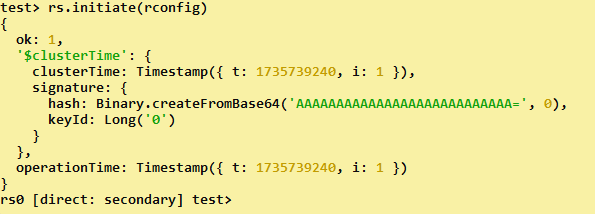
4) Execute rs.initiate(rconfig) command to start the replica set configuration process. 


>rs.initiate(rconfig)


5) Check the status of ReplicaSet after initialization

>rs.status()


6) Run db.isMaster() command to see node status


Configured a MongoDB ReplicaSet successfully!


When a Security Recommendation Became an Operational Incident A database team was implementing recommendations from the latest CIS Benchmark...